
Multi-branch
Multi-Branch Software for Shops and Businesses in Pakistan
One business, several branches. Each branch keeps its own sales, stock, cash, udhar, staff and reports; the owner switches between them from the header in one login. Cash and goods sent to another branch are written on both sides at once, who owes whom is always known, and All branches puts every branch side by side with the organisation total.
How it works
Multi-branch, step by step
- 01
Add a branch
A new branch is made from an existing one in minutes: items with their units, prices, categories and barcodes, customers and suppliers are copied, with zero opening stock and balances. Give each user the branches he may enter.
- 02
Work in one branch at a time
Every screen shows the branch you are standing in. Switch from the header; the branch name is on every print.
- 03
Send cash to another branch
One entry in Cash & Bank writes the sender’s account and the receiver’s account, tells both branches’ Admins, and records that the receiver owes it back.
- 04
Send goods to another branch
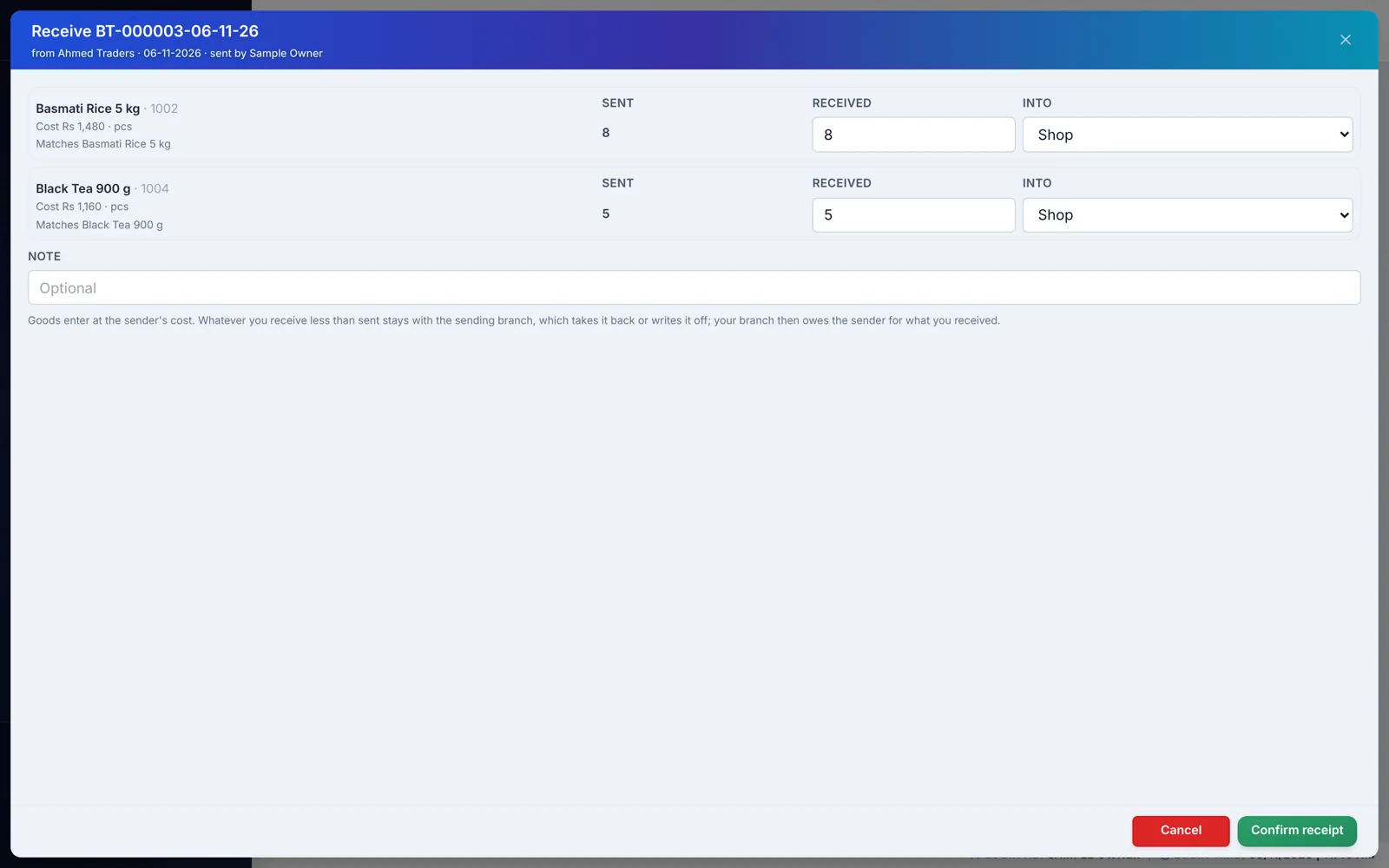
Pick the items, the location and the lot; a challan prints and the goods leave at cost. The other branch counts them in, line by line, into the location it chooses. An item it does not have is created from the sender’s definition.
- 05
Settle what came up short
Anything not received stays the sender’s: take it back into stock or write it off with a reason. Written-off goods go to the sender’s Profit & Loss on their own line.
- 06
Read all branches together
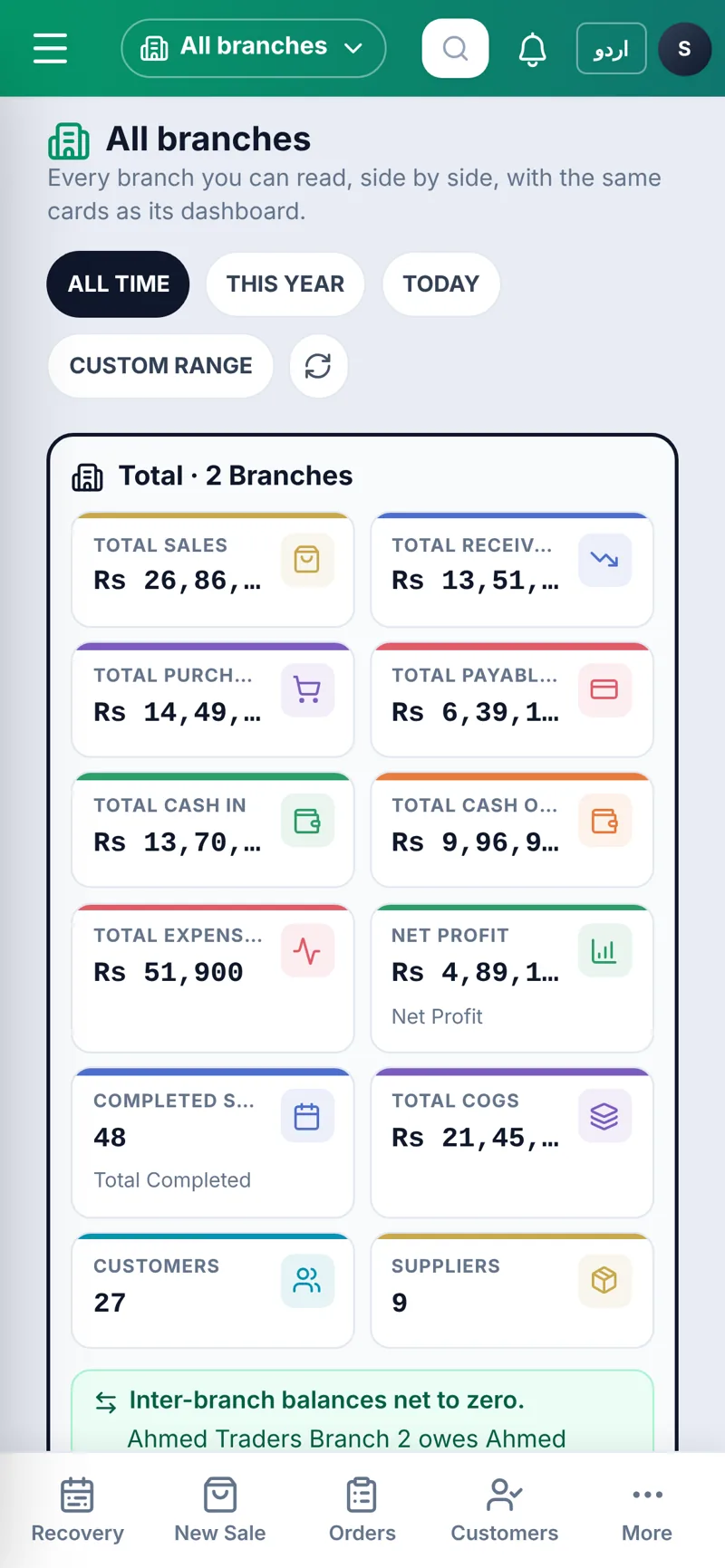
All branches shows each branch’s sales, receivables, payables, cash, expenses and net profit with the total, plus nine combined reports and the inter-branch balances, goods and cash apart.
Example
A worked example: goods from the main branch to a new one
Made-up figures. The main branch sends 20 cartons costing Rs 2,000 each to Branch 2. Branch 2 counts 19; one carton is missing, and the main branch takes it back into its stock.
| Step | Main branch | Branch 2 |
|---|---|---|
| Send 20 cartons at cost | Stock −20; Rs 40,000 in transit; challan printed | Told: incoming transfer |
| Branch 2 counts 19 in | Branch 2 owes it Rs 38,000 (goods) | Stock +19 at Rs 2,000 each; owes Rs 38,000 |
| Short carton taken back | Stock +1; nothing owed for it | — |
| Branch 2 sends Rs 38,000 cash | Cash +38,000; balance between branches Rs 0 | Cash −38,000; balance Rs 0 |
Had the main branch written the missing carton off instead, Rs 2,000 would appear on its Profit & Loss as goods lost in transit, with the reason, and in its Stock Adjustments report. Hand stock adjustments are not touched by this.
Screenshots
Multi-branch in the app
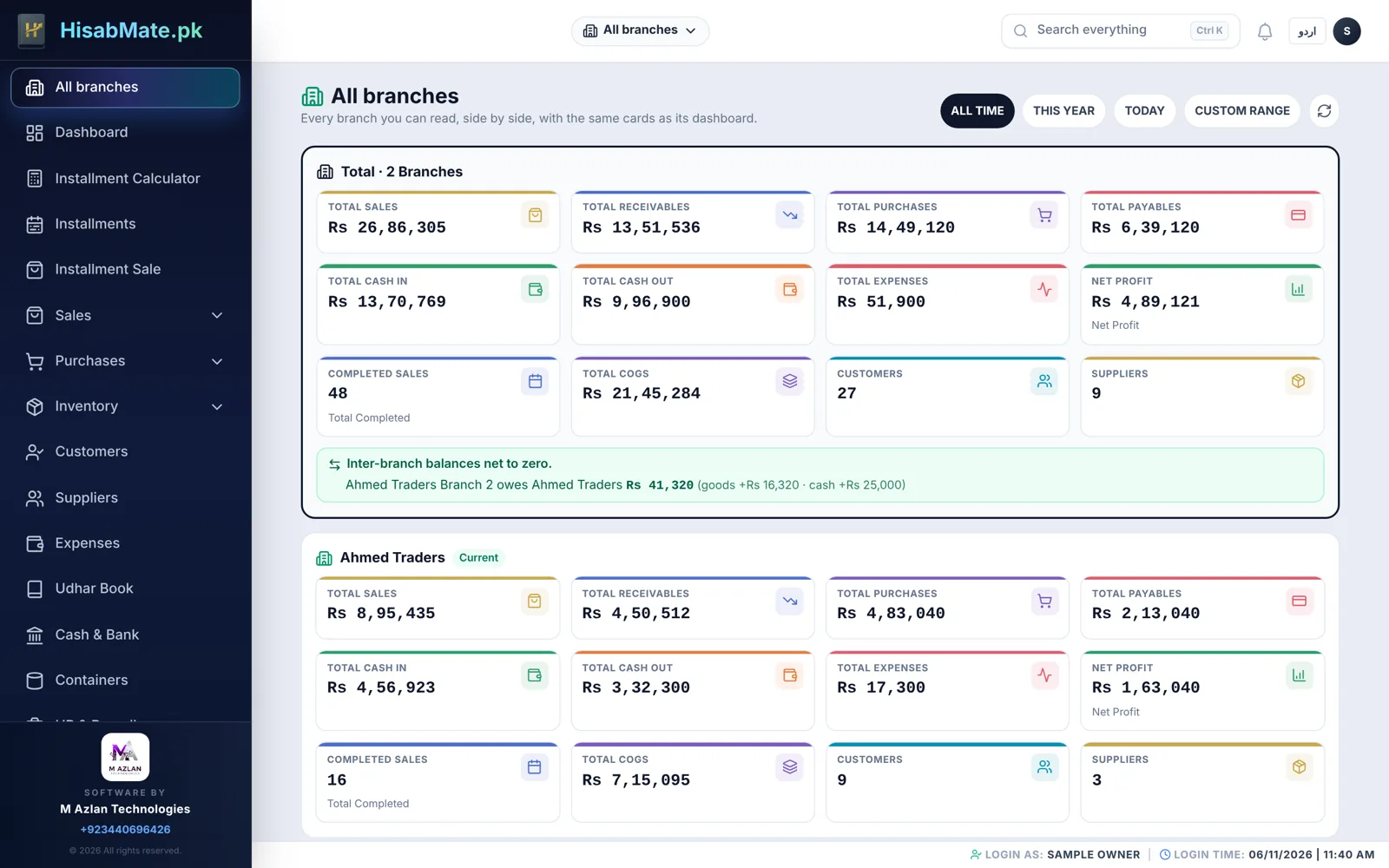
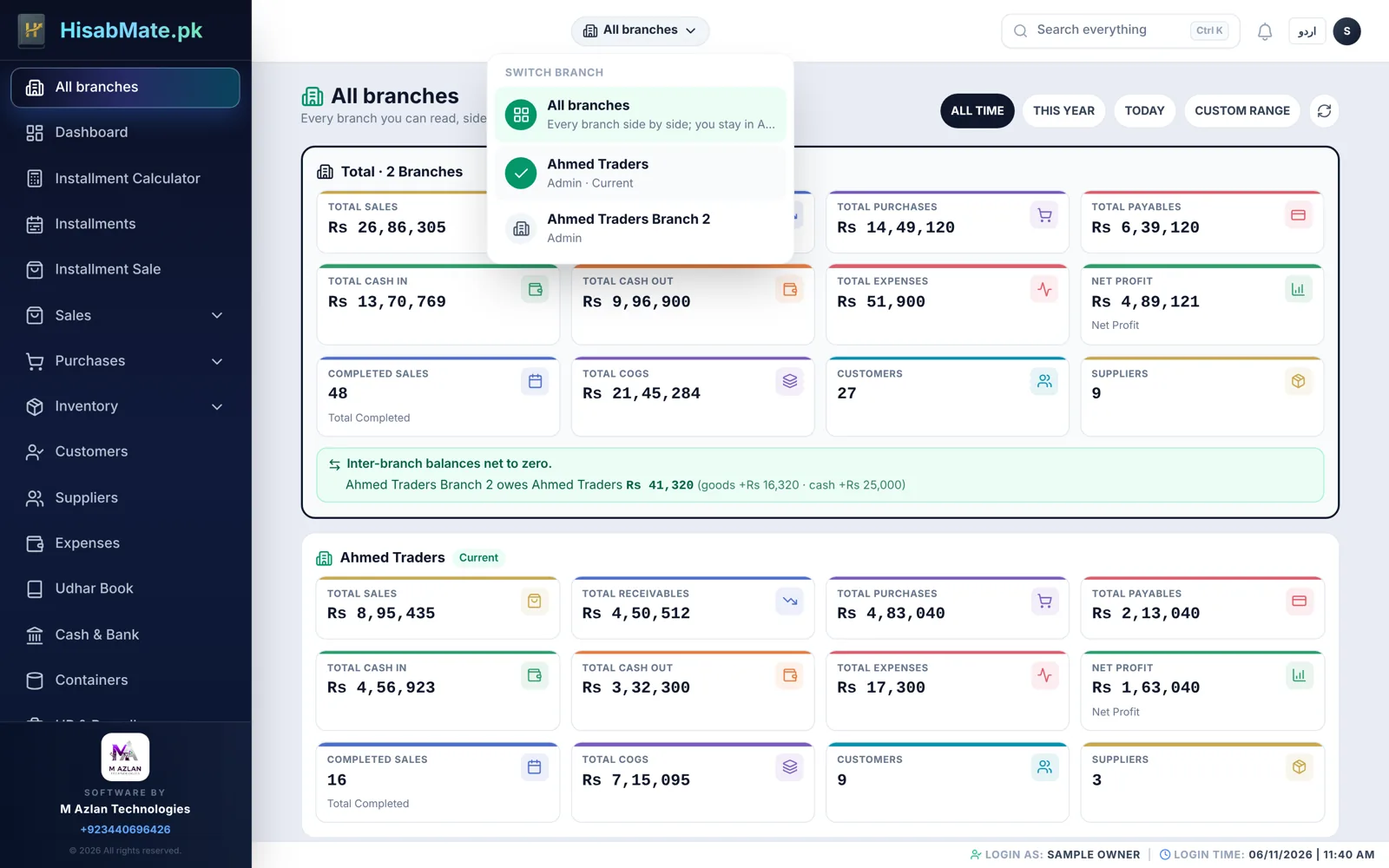
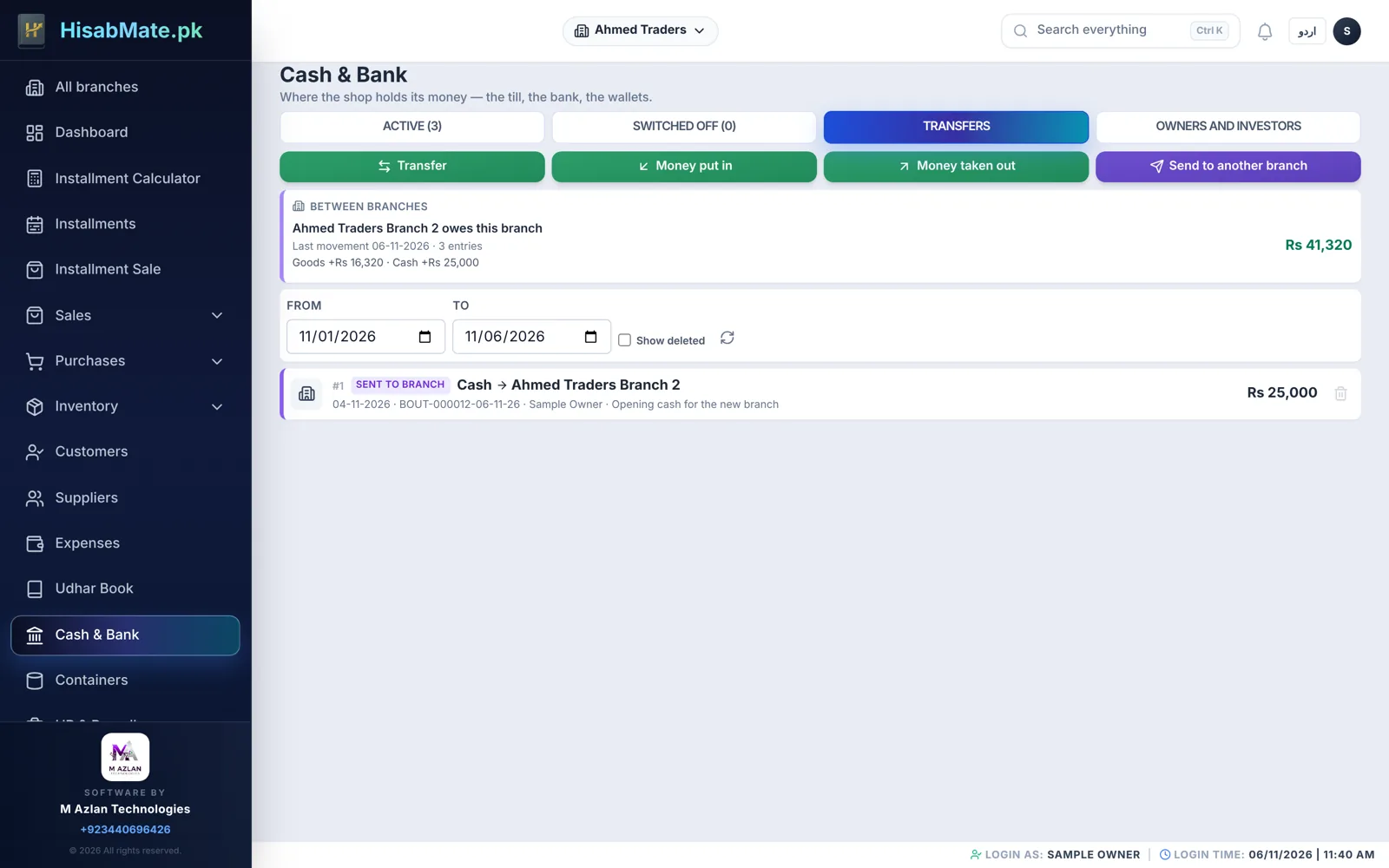
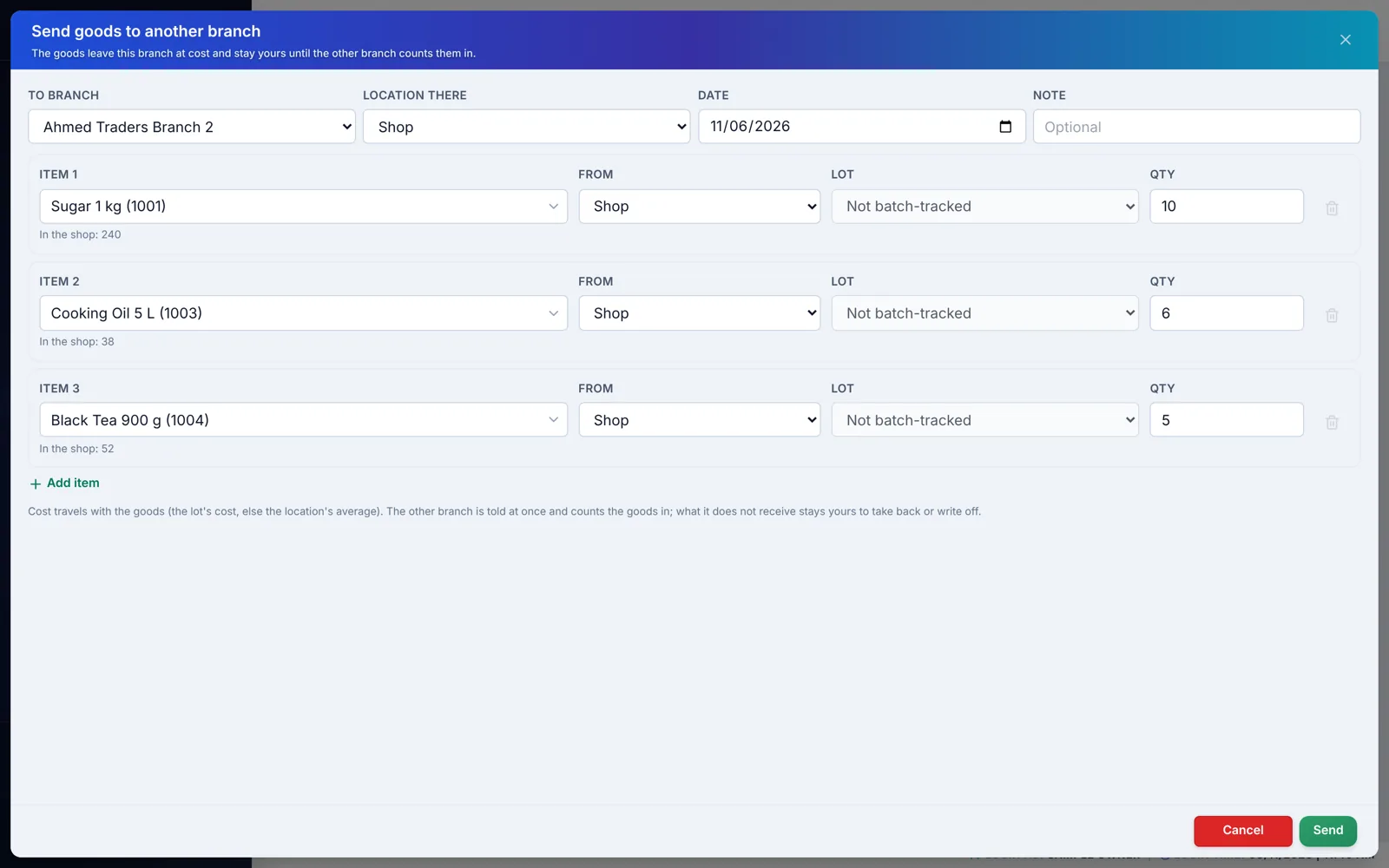
Real HisabMate screens with a sample shop: every name, phone number and amount is sample data.
Everything included
16 features in this module
- Each branch has its own sales, purchases, stock, cash and bank, udhar, customers, suppliers, staff and reports
- Users and roles per branch; a user may be given access to more than one branch and switches from the header
- New branch in minutes: items with units, prices, categories and barcodes, customers and suppliers copied from an existing branch, with zero opening stock and balances
- All branches: every branch’s sales, receivables, payables, cash in and out, expenses, cost of goods and net profit side by side, with the organisation total
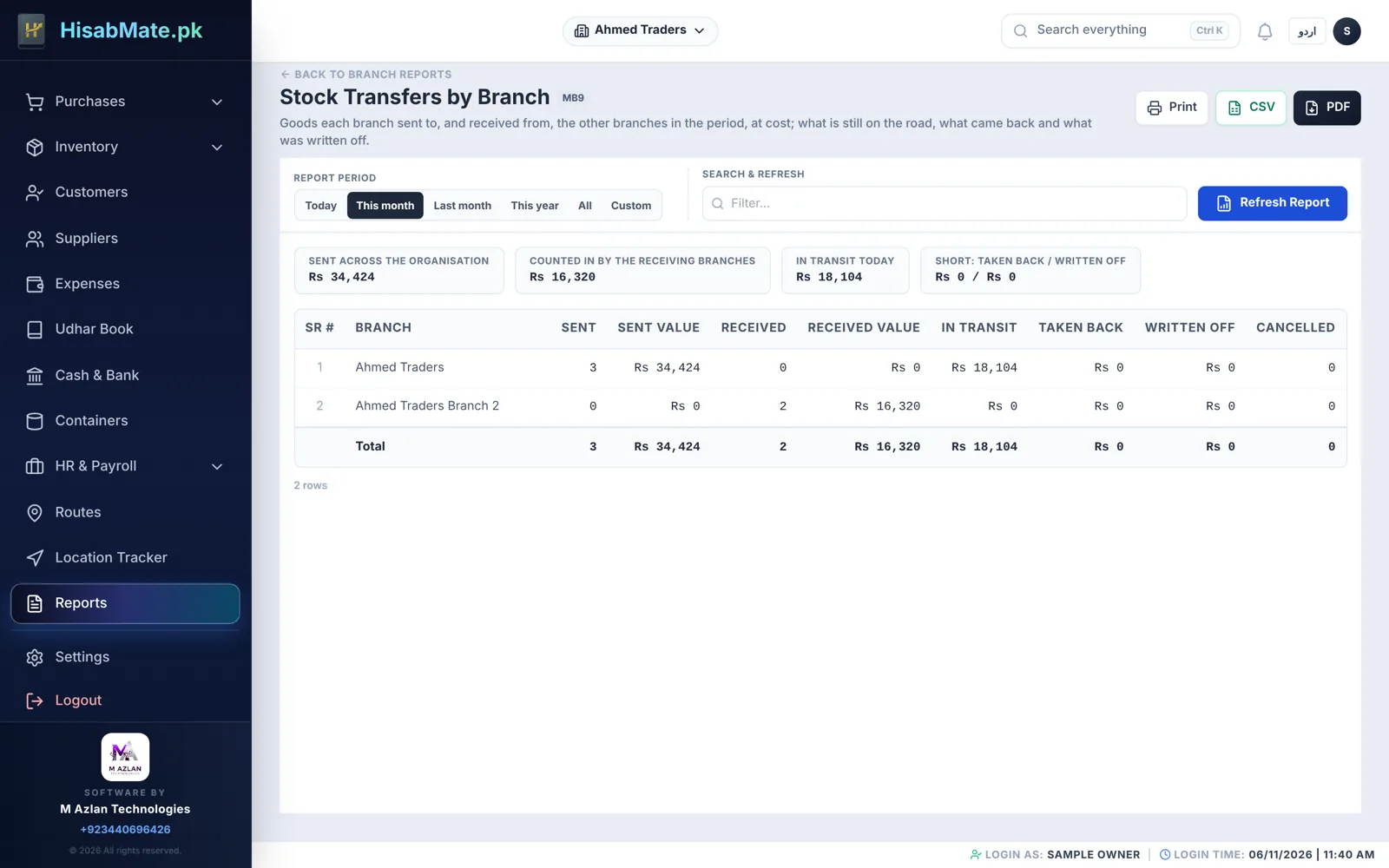
- Nine combined reports by branch: sales, cash and bank, receivables, instalments due, stock, expenses, profit and loss, inter-branch balances, stock transfers
- Cash between branches: one entry writes the sender’s and the receiver’s Cash & Bank, with a low-balance warning that never blocks
- Goods between branches: send from the shop or a warehouse, by lot where the item is batched, at cost; a challan prints
- The receiving branch counts the goods in, line by line, into the location it chooses; an item it does not have is created from the sender’s definition
- Short quantities stay the sender’s: take them back into stock or write them off with a reason
- Cancel a transfer while nothing has been received; the goods return where they left from
- Between branches: who owes whom, goods and cash apart, netted per branch; settled by a cash transfer back
- Stock ledger shows every branch movement, so opening plus in minus out still ties to the stock on hand
- Stock in Transit and Branch Transfers reports per branch; In transit on Stock by Branch, so the organisation’s stock is counted once
- Goods written off in transit are the sender’s loss on its Profit & Loss, on their own line; hand stock adjustments are not touched
- Admins of both branches are notified of every send, receipt, shortage and cancellation; everything is on the audit record
- Reports across branches print under the organisation’s name — All branches
Who uses it
Who it is for
Installment Businesses & Showrooms
- Installment Business
- Bike / Motorcycle Showroom
- Car Showroom & Used Car Dealer
- Rickshaw & Loader Dealer
- Mobile Phone Shop
- Electronics & Home Appliances (AC, Fridge, LED)
- Furniture Shop
- Dowry (Jahez) Items on Installments
- Solar Panels & Inverters Dealer
- Laptop & Computer Shop
- Generator & UPS Dealer
- Tractor & Agri Machinery Dealer
- Plots & Real Estate on Installments
Shops, Marts & Retail Stores
- Kiryana / General Store
- Mart & Superstore
- Bakery, Sweets & Nimco Shop
- Mobile Accessories Shop
- Garments & Boutique
- Cloth & Textile Shop
- Shoe Store
- Cosmetics & Beauty Shop
- Electric Store
- Hardware & Tools Store
- Sanitary & Paint Store
- Auto Parts & Spare Parts
- Tyre & Battery Shop
- Bookshop & Stationery
- Toys & Gift Shop
- Crockery & Kitchenware
- Sports Shop
- Computer Accessories & IT Shop
- Perfume & Attar Shop
- Optical Shop
- Dry Fruit & Pansar Store
Wholesale & Distribution
FAQ
Questions
What is a branch in HisabMate?
A branch is a complete set of books — sales, purchases, stock, cash and bank, udhar, customers, suppliers, staff and reports — under the same business. A second shop, a depot, a showroom or a housing scheme is a branch. Each branch has its own users and roles; a user may be given access to more than one branch and switches from the header.
Do branches share stock or customers?
No. Each branch keeps its own stock, customers and suppliers. When a branch is created, items, prices, units, customers and suppliers can be copied from an existing branch so nobody retypes them, but from then on each branch’s lists are its own.
How does cash move from one branch to another?
In Cash & Bank, Send to another branch: pick the account the money leaves and the account it lands in. Both branches’ books are written in one step, both branches’ Admins are told, and the Between branches card shows that the receiver owes it back until it is sent back.
How do goods move between branches?
From Inventory → Branch transfers. Choose the items, the location they leave from and the lot where the item is batched; a challan prints and the goods leave at their cost. They are in transit until the other branch counts them in on its Incoming tab, line by line, into the location it chooses. Only then does the receiving branch owe the sender for what it received.
What if the receiving branch does not have that item?
It is created there at receipt from the sender’s definition — name, units, prices, category — and the goods land on it. The receiving screen says so before the tap. An item the branch already has is matched by code and name, or by name within the same category.
What happens when goods come up short?
The quantity not received stays with the sending branch, which decides per line: take it back into a location of its own, or write it off with a reason. A write-off is the sender’s loss and shows on its Profit & Loss on its own line, and in its Stock Adjustments report. A transfer can be cancelled while nothing has been received; the goods return where they left from.
Who owes whom between branches?
One ledger per pair of branches, goods and cash apart and netted. The Between branches card in Cash & Bank, the Inter-branch Balances report and the All branches page show it, and across the whole business the balances net to zero — if they ever did not, the page says so.
Which reports cover all branches?
Nine combined reports by branch — Sales, Cash & Bank, Receivables, Instalments Due, Stock (with goods in transit), Expenses, Profit & Loss, Inter-branch Balances and Stock Transfers — printed under the organisation’s name. Each branch also has its own Branch Transfers register and Stock in Transit report, and its stock ledger shows every branch movement.
Can a staff member see other branches?
Only the branches he was given access to, with the role he has in each. The All branches page and the combined reports show a reader only the branches where his role may view reports.
Does it work on the phone?
On a PC and in the mobile browser today; in the Android app from version 1.2.27. Every screen is in English and Urdu.
What does an extra branch cost?
Branches are enabled per business and quoted by the number of branches. Ask for a free demo and a quote on WhatsApp.
Roman Urdu
Ek business ki do ya zyada branches ka software?
HisabMate mein har branch ki apni sales, stock, cash, udhar aur reports; owner ek login mein branch badalta hai, aur All branches par sab branches ek saath.
Ek branch se doosri branch ko maal ya cash bhejna?
Cash ek entry se dono branchon ki books mein; maal challan ke saath lagat par jata hai, doosri branch gin kar leti hai, aur hisaab rehta hai ke kaun kis ka maqrooz hai.
Nai branch mein items dobara type karne parenge?
Nahi. Items, rates, units, customers aur suppliers purani branch se copy ho jate hain; stock aur balance zero se shuru hote hain.
Works together with
Related modules
See it on your own business
Branches are enabled per business and quoted by the number of branches. Ask for a free demo and a quote on WhatsApp.